What if a listing looks right, but its details or delivery instructions don’t match what you expected? If you’re ready to buy MM2 guns, check the exact item name and listing details before checkout. A clear image is useful, but it shouldn’t be the only thing you rely on.
You want the gun you chose, a clear idea of how it reaches your in-game inventory, and no unnecessary risk to your account. This guide explains how to match a listing to your intended MM2 gun, understand MybeGG’s advertised in-game delivery, and use a practical safety checklist at checkout. It also covers why community trade values aren’t the same as cash prices and why it’s wise to review current Roblox and Murder Mystery 2 rules before a third-party purchase. Keep your Roblox password, authentication codes, and session cookies private. 🎮
Key Takeaways
- Match the listing’s item name, category, details, and availability to the exact gun you want in-game.
- Before you buy MM2 guns, review current Roblox and Murder Mystery 2 rules so you can make an informed choice.
- Use the checkout summary and displayed instructions to understand what to expect after purchase, then check your in-game inventory.
- Keep account credentials private and use a simple safety check before completing checkout.
- MybeGG’s store includes Murder Mystery 2 guns, with in-game delivery advertised by the store.
Buying MM2 Guns: What You’re Actually Choosing
Before comparing listings, define what you want: a specific in-game gun associated with Murder Mystery 2. The decision is about the item described on the listing, not a Roblox account or a gameplay service. Keeping that distinction in mind helps you focus on the item details and spot a listing that doesn’t match your intended purchase.
What does buy MM2 guns mean?
To buy MM2 guns means shopping for gun items connected to Murder Mystery 2. It doesn’t mean purchasing an account, buying general Roblox currency, or paying for coaching. A listing should describe the item itself. Don’t assume a gun’s rarity, artwork, or name gives it a gameplay advantage unless reliable game information supports that claim.
These items are part of the broader category of virtual goods and in-game items. Players may value them for their appearance, rarity, or place in a game’s community. Those general descriptions don’t establish what a particular listing includes, though. Use the details shown for the individual item instead of relying on category labels or assumptions from other MM2 trades.
This guide focuses on assessing a listed MM2 gun before checkout, not on setting a price or explaining every kind of MM2 trade. MybeGG sells Murder Mystery 2 items, including guns. Start by comparing the listing’s exact name with the gun you have in mind. Similar names or images can be easy to confuse when you browse quickly.
Pause on the listing and check:
- Item name: Does the wording match the gun you want?
- Category: Is it identified as a gun rather than another item type?
- Listing details: Do the description and image appear consistent with the selected item?
- Availability and checkout summary: Do the displayed details still match when you’re ready to proceed?
If any detail doesn’t line up, don’t guess. Recheck the selection before checkout. Matching the listing to the item you intend to receive is the first practical step toward avoiding a mistaken purchase.
What should you know about third-party purchases?
Don’t assume a third-party purchase is automatically risk-free, allowed, or prohibited in every situation. Rules can change, so review the current Roblox terms and Murder Mystery 2 rules before deciding whether to proceed. A forum title or another player’s comment may not give you the full or current picture.
Use the current rules to make your decision, then check two practical things: whether the listing clearly describes the item you want and whether you can protect your account credentials throughout the transaction. The sections below explain how to assess the listing and understand the purchase process without confusing an in-game item with access to your account.
How to Check an MM2 Gun Listing Before Checkout
A quick scan isn’t enough when listings look similar. Verify the item name, category, description, image, displayed availability, and checkout summary. Together, these details can help you catch a mismatch before placing an order. Check the listing itself rather than filling in gaps with assumptions.
Match the listing to the MM2 gun you want
Start with the full item name and category. Then compare the image with the description. Neither one should have to do all the work: an image may look familiar, while the written details clarify what the listing represents. If the name, category, description, and image don’t seem consistent, pause before adding the item to your cart.
Rarity labels can help describe an item, but they aren’t a reliable shortcut for identifying the exact gun or variant. A label alone doesn’t tell you everything included in a listing. Prioritize the displayed item details and compare them with the specific gun you’re looking for in-game. If a term is unclear, don’t guess what it means.
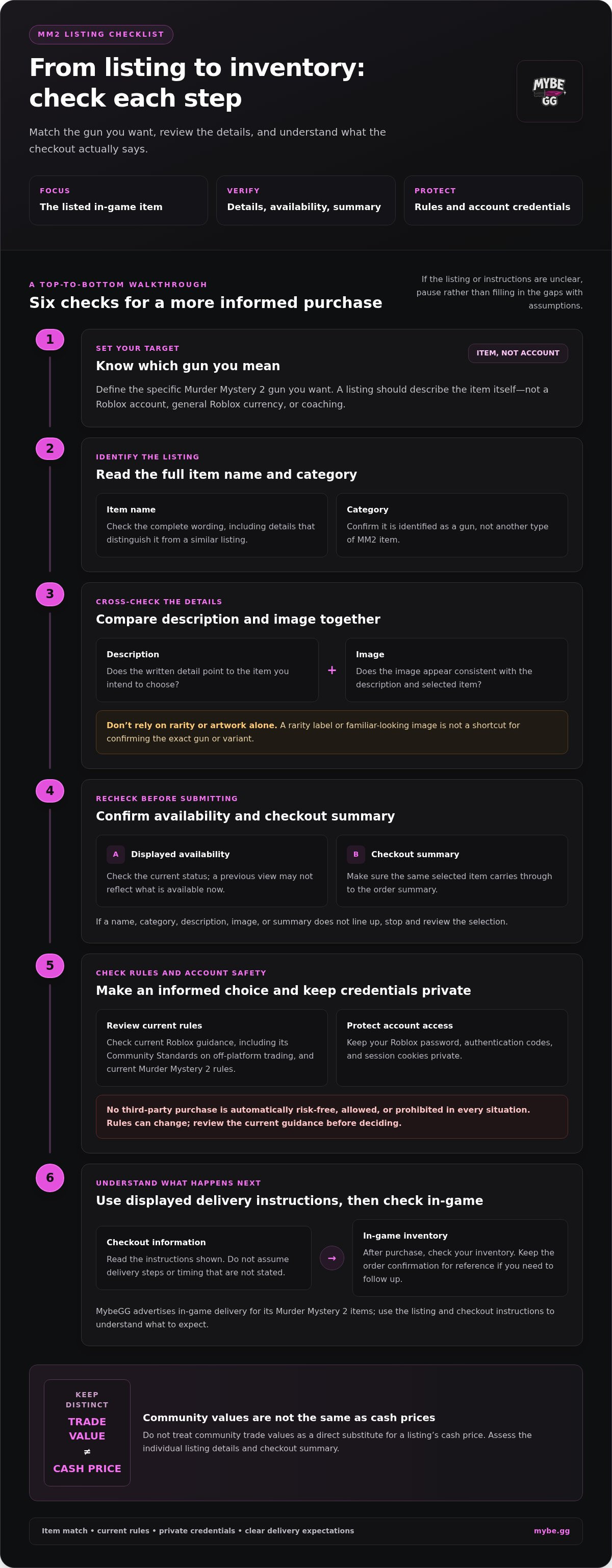
Use this quick listing check:
- Item name: Read the complete name, including wording that distinguishes it from a similar listing.
- Category: Make sure it’s identified as a gun, not another type of MM2 item.
- Description and image: Compare them side by side for a consistent match.
- Displayed availability: Check the listing’s current status. A previous view may not reflect what’s available now.
- Checkout summary: Confirm the same item carries through from your selection.
For example, if you want a particular variant, don’t rely on a familiar-looking image or rarity label alone. Confirm that the listing name and details point to that choice. A mismatch is a reason to stop and review, not to hope the order means what you expect.
Review the checkout details before paying
Once the item matches, review the checkout screen before submitting your order. Check the selected item and order summary again. Use the information displayed there as your guide, and don’t assume delivery steps or timing that the checkout doesn’t state. Keep the order confirmation for reference if you need to follow up.
Consider current platform rules as part of your decision. Roblox’s Community Standards on off-platform trading are one place to review the platform’s current guidance. Read them alongside the current Murder Mystery 2 rules. A listing’s wording or another player’s interpretation isn’t a policy guarantee. The rules, item match, and checkout details all matter.
Ready to compare a listing with this checklist? Browse MybeGG’s Murder Mystery 2 items and review each item’s displayed details before checkout.
Is It Safe to Buy MM2 Guns? Check Rules and Account Risks
No third-party purchase is automatically risk-free. Before you decide to buy MM2 guns, check the current rules that apply to your account and the game. Protect your login details throughout the process, too. A clear listing or smooth checkout doesn’t replace those checks.
Check current platform and game rules
Review Roblox’s official terms and Community Standards, along with current Murder Mystery 2 guidance. Read the relevant passages yourself. A forum post, search snippet, or old answer may leave out context or no longer reflect current rules.
Pay attention to guidance about virtual items, trading, off-platform activity, or real-world transactions. A seller’s description or another player’s opinion isn’t a ruling from Roblox or the game’s creators. If you can’t tell how a rule applies, pause until you understand it. That’s better than guessing about a potential account impact.
Protect your Roblox account during a purchase
A normal item purchase should never require you to hand over control of your Roblox account. Keep your password, recovery codes, and two-factor authentication codes private. Never share a browser session cookie, including one called .ROBLOSECURITY. Anyone asking for these details is asking for account access, not just the username needed to identify a player.
Stop and reassess if a request goes beyond the store’s displayed checkout and delivery instructions. Watch for:
- Requests for your password, authentication code, recovery code, or session cookie.
- Instructions to install unfamiliar software or give someone remote access to your device.
- Pressure to act immediately, move the transaction to an unrelated channel, or ignore the listed process.
- Checkout or delivery directions that change unexpectedly or ask for information unrelated to identifying your Roblox account.
These are warning signs to take seriously, not proof that any specific store has acted improperly. Don’t click through just to keep a deal moving. Review what you’re being asked to do, compare it with the store’s normal instructions, and stop if the request would expose your account.
Keep the boundary simple: share only the information the stated process requires, and never share credentials or account access. If you’ve already disclosed a password or code, use Roblox’s official account-security guidance to secure your account promptly. A careful pause helps you make a more informed decision before checkout.
What to Expect After Buying an MM2 Gun Online
Checkout is only one part of the process. After placing an order, follow the instructions displayed for that purchase, then check the intended Roblox account and your in-game inventory. MybeGG advertises instant in-game delivery, but this isn’t a promise of an exact arrival time. Follow the order’s stated process and keep your confirmation handy.
Follow the displayed in-game delivery instructions
Start with the order confirmation and read each instruction shown for your purchase. Follow those directions rather than relying on a guide for a different order or guessing what to do next. Make sure you’re using the Roblox account you intended for delivery. You shouldn’t need to share its password, recovery codes, or authentication codes to follow the instructions.
After completing the displayed steps, open Murder Mystery 2 on that account and check your in-game inventory for the item you selected. If it doesn’t appear immediately, don’t place another order just to troubleshoot. Revisit the instructions and confirmation first, and make sure you completed the process and are checking the correct account.
Keep the details that can help you follow up:
- Order confirmation: Save the confirmation or order reference shown after checkout.
- Selected item: Note the item name shown in the order summary.
- Instructions: Keep the displayed delivery directions available until you’ve checked your inventory.
- Relevant screenshots: If useful, save the confirmation and checkout details, but never capture or share passwords, codes, or other login credentials.
If the item does not appear as expected
Recheck the order confirmation, selected item, and checkout instructions. Make sure you’re looking in the intended Roblox account and have completed the steps described for that order. Follow the process shown by the store, but don’t assume an unstated delivery window or treat “instant” as a guaranteed arrival time.
If the item still isn’t visible, use MybeGG’s advertised live chat support for purchase questions. Share relevant order details, such as the order reference and item name, to explain the issue. Keep your account credentials private. Support for an order should not require your password, recovery codes, or two-factor authentication codes.
Clear order details make it easier to explain what you’ve already checked. If you’re ready to choose an item, browse MM2 guns and other Murder Mystery 2 items, then follow the checkout instructions shown for your order.
Buy MM2 Guns Through MybeGG: Choose a Listing and Take the Next Step
You’ve checked the item details and considered the account-safety basics. Make one last pass before checkout. MybeGG sells Murder Mystery 2 items, including guns, through its online store. A short checklist helps you confirm your choice, protect your account, and keep the order details easy to follow.
A quick pre-purchase checklist
Before you buy MM2 guns, pause and check each point. If something doesn’t line up, review it instead of rushing through checkout.
- Match the item: Confirm the listing’s full name and details describe the MM2 gun you intend to choose.
- Review current rules: Read the current Roblox terms and relevant Murder Mystery 2 guidance before making a third-party purchase decision.
- Protect your account: Keep passwords, recovery codes, two-factor authentication codes, and account access private.
- Read checkout details: Check the selected item and order summary, then follow the instructions displayed for your order.
- Save your confirmation: Keep the order information available in case you need to follow up about the purchase.
That’s the pre-check: item match, current rules, private credentials, and clear checkout details. Don’t let a listing image or a hurry replace those checks. If anything is unclear, pause before submitting the order and review the information shown in the store’s checkout process.
Browse MybeGG’s MM2 items
MybeGG advertises instant in-game delivery for its items, along with daily restocks. Instant delivery is an advertised service, not a guaranteed arrival time for every order. Follow the instructions displayed for your purchase and use the order information to confirm what you selected. Keep your Roblox login details private throughout.
Questions about the store or your purchase? MybeGG advertises 24/7 live chat support for store questions. If you’re asking about an existing purchase, have your order reference and item name handy. Share relevant order details only, never your password, recovery codes, or authentication codes.
Your next step is simple: browse MybeGG’s Murder Mystery 2 items, compare a gun listing with your intended choice, then review the checkout details at your own pace. View MybeGG’s MM2 item listings and choose with the checklist in mind.
Make Your Next MM2 Choice with Confidence
Choose an item because it’s one you genuinely want in your inventory, not just because it catches your eye first. Think about what appeals to you and what you’ll enjoy owning. A considered purchase reflects your own taste rather than pressure to follow a trend or rush into a decision.
Give yourself time to browse. You don’t need to turn every visit into an instant purchase. If you’re ready to buy MM2 guns, choose the listing that matches what you want, then review the item and checkout details before proceeding.
Browse MM2 items at MybeGG and explore the available Murder Mystery 2 listings. 🎮
Frequently Asked Questions
Can you buy guns in Murder Mystery 2?
Online stores may list Murder Mystery 2 gun items, but a listing being available doesn’t establish whether a third-party purchase follows current platform or game rules. Before deciding, review the latest official Roblox terms and relevant Murder Mystery 2 guidance. Rules and game systems can change, so don’t treat an old forum answer or another player’s experience as definitive permission for your situation.
Is it safe to buy MM2 guns online?
No third-party purchase is automatically risk-free. Safety depends on understanding current rules, checking that the listing clearly describes the item, using the store’s normal checkout, and protecting your account. Never share your password, recovery codes, two-factor authentication codes, or account access. Before you buy MM2 guns, review current Roblox and Murder Mystery 2 guidance and decide whether you’re comfortable proceeding.
How much do MM2 guns cost?
There isn’t one fixed price for every MM2 gun listing. Prices and values can vary, so use the current item page and checkout summary for the specific selection rather than relying on an old screenshot, chat message, or remembered figure. MybeGG describes its prices as tied to in-game item value. Review the displayed total before submitting your order instead of assuming a price in advance.
Do you need to give a seller your Roblox password to receive an MM2 gun?
No. Never give a seller your Roblox password, recovery code, or two-factor authentication code, and don’t hand over account access. Follow only the delivery instructions displayed for your order while keeping control of your account. A request to log in through an unfamiliar page, install software, or share credentials is a reason to stop and reassess.
What should you do if an MM2 gun does not appear after checkout?
Check your order confirmation and the delivery instructions shown for that purchase. Confirm you’re viewing the intended Roblox account and the relevant in-game inventory. Don’t assume a specific arrival time or place a duplicate order just to troubleshoot. If you still have a question, MybeGG advertises live chat support for purchase questions. Share relevant order details, but keep login credentials private.
Can you buy an MM2 gun that is out of stock?
Whether an item can be purchased depends on the status shown on its current listing, so don’t assume an unavailable gun can be ordered. MybeGG advertises daily restocks and offers New Stock Alerts for updates. These don’t guarantee that a particular item will return or indicate when it might restock. Check the listing and alert options for current information before planning a purchase.


مشاركة:
SAB: Brainrots Prices, Income, Trading Values and Free Options