The flashiest MM2 knife isn’t automatically the right buy. If you want to buy MM2 knives, compare the exact item, its listed value, and the purchase details instead of choosing only by name or appearance. A few focused checks can help you find a knife that fits your style and budget.
It’s fair to wonder whether a price makes sense, how delivery works, or what to do if you need help. This guide explains what to compare, what to review before checkout, and how to use trading values as context rather than as a promise of resale worth. It also covers the purchase steps, including the Roblox username needed for an in-game trade. Never share your password or account cookies.
MybeGG advertises instant in-game delivery, daily restocks, and 24/7 live chat support. Use the listing and order instructions to understand the item you’re choosing and how to receive it. Ready to choose with more confidence? Start with the checks that matter. 🔪
Key Takeaways
- Before you buy MM2 knives, decide what you want from an item so you can compare listings against your preferences.
- Use in-game value as one comparison point, not a promise of what an item will sell for later.
- Store purchases and player trading involve different trade-offs, from a direct checkout process to negotiation.
- Check the item name and listing details before checkout to avoid choosing the wrong knife.
- MybeGG’s MM2 store includes knives, guns, and bundles, with advertised daily restocks and live chat support.
Buy MM2 Knives: What to Know Before Choosing an Item
Buying an MM2 knife means purchasing a virtual item for use in Murder Mystery 2. If you want to buy MM2 knives online, start by deciding what you want, then compare listings against that preference. A clear goal makes it easier to focus on the right item name and details instead of getting distracted by every appealing option.
This guide focuses on choosing knives, not cataloguing every MM2 item or assigning a definitive value to the full collection. MM2 items sit within broader virtual item economies, where appearance, rarity, and community interest can shape how players think about an item. These factors provide context, but they don’t replace your own priorities.
What should you decide before buying an MM2 knife?
Set your spending limit first, then write down the exact knife name you’re looking for. This gives you a practical filter as you browse and helps you avoid treating every appealing listing as a serious option. Check the wording carefully: similar-looking listings may refer to different items.
Next, separate what you like about a knife from what you think it may be worth. Do you want it for its appearance and a place in your inventory, or are rarity and community value also important to you? You can care about both, but they are different considerations. A knife that suits your taste may be the better fit for your goal, even if another item gets more attention in value discussions.
- Personal preference: Note the look or style you want.
- Value context: Decide whether rarity or community interest matters to you.
- Exact match: Keep the item name handy while comparing listings.
Keep your shortlist focused. Browsing with a few clear criteria is more useful than scrolling through items you hadn’t planned to consider.
Individual MM2 knives or bundles: which suits your goal?
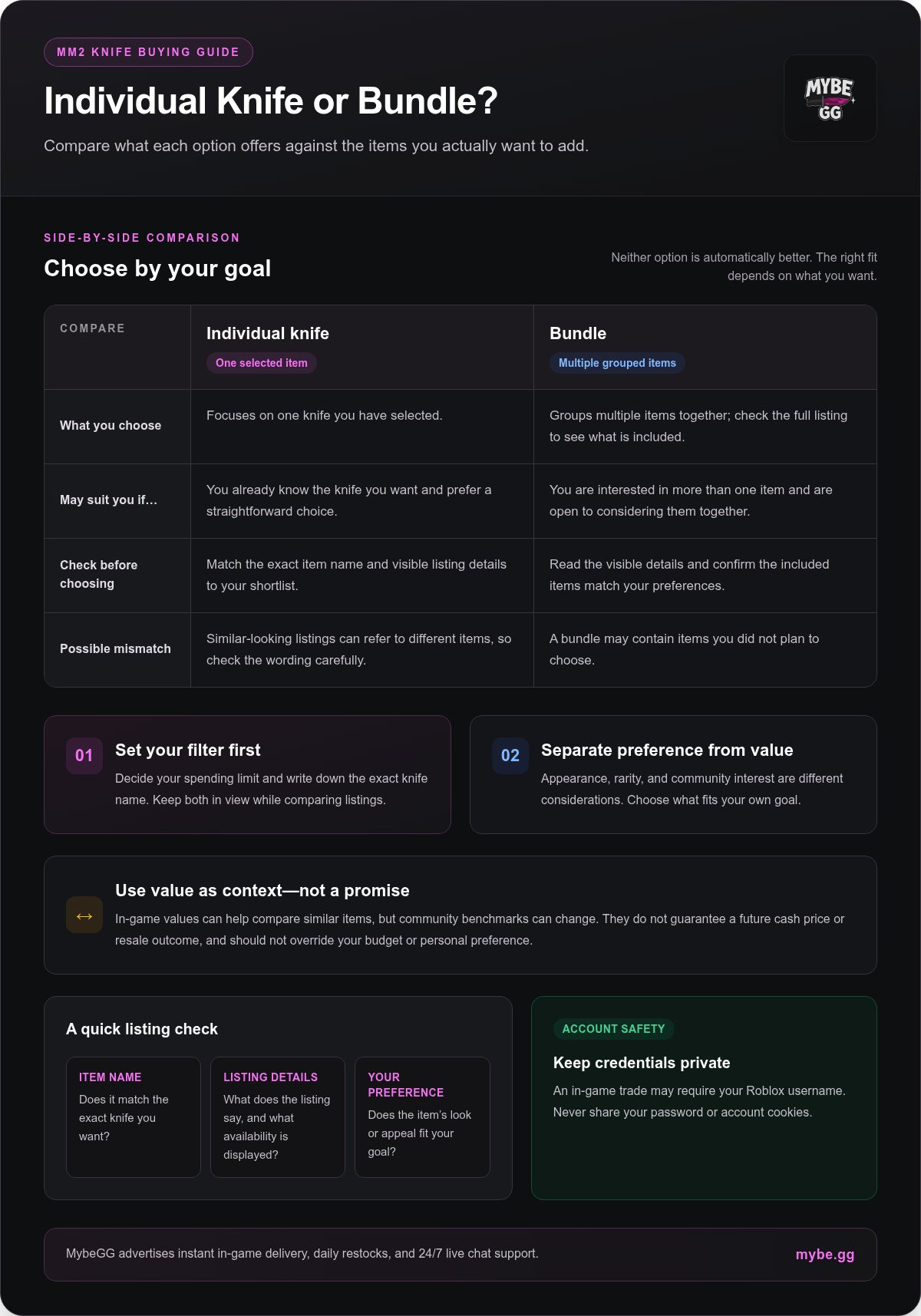
An individual knife purchase focuses on one selected item. It can suit you if you already know which knife you want and prefer a straightforward choice. A bundle groups multiple items together, so it may be worth comparing if you’re interested in more than one. The right option depends on what you want to add, not on one being automatically better.
Before choosing a bundle, read its visible listing details and check whether the included items match your preferences. If you want one specific knife, a bundle may include items you didn’t plan to choose. If you’re open to multiple items, reviewing the full bundle description helps you understand what you’re considering.
As you browse, keep your preferred item name and spending limit in view. Compare the listings against both, whether you’re choosing one knife or considering a bundle.
How to Compare MM2 Knife Listings and In-Game Values
A useful comparison starts with a match: does the listing describe the knife you want, and do its details fit your priorities? Don’t let a value figure make the decision for you. Community values can add context, but your visual preference, spending limit, and understanding of the listing matter too.
Which listing details deserve a closer look?
Check the exact item name first, then read the visible listing details and availability before checkout. Similar names don’t mean items or sets are interchangeable. If a listing groups multiple items together, confirm what’s included rather than assuming it’s a single knife. Take time to match the item to your shortlist before moving on.
Quick comparison framework
Item name: The exact knife you’re considering.
Listing details: What the listing says about the item, plus its displayed availability.
Buyer preference: Whether its look, rarity, or other appeal fits what you want.
Apply the framework to two listings side by side. Write down each item name as shown, note the details displayed, then decide which better matches your goal. This keeps the comparison focused if one option stands out for its appearance and another for its place in community-value discussions.
How should in-game value factor into your choice?
Use in-game value as a reference for comparing similar items, not as a forecast. Community-maintained benchmarks can reflect trading interest and other in-game factors, but they can change and don’t guarantee a future cash price or resale outcome. Compare like with like: a knife against another knife, not against a set or an item from a different category.
MybeGG describes its pricing as tied to in-game item value. That gives you a point of comparison, not a promise that an item’s value will hold or that you can resell it for a particular amount. Keep the distinction clear: a value reference can help you understand a listing, but it shouldn’t override your spending limit or personal preference.
- Want it for its look? Give personal appeal more weight than a community ranking.
- Comparing trading context? Check similar items using the same kind of value reference.
- Unsure about a listing? Recheck the exact name and displayed details before deciding.
General online-shopping basics still matter at checkout. The CISA safe online shopping tips cover practices for protecting transaction details and online accounts. Once you’ve narrowed down what you want, compare MM2 knife listings against the same checklist and make an informed choice.
Buying MM2 Knives Online: Store Purchase or Player Trading?
There are two common routes to consider: choose an item through an online store, or negotiate a trade with another player. Neither is automatically the right pick. Your decision depends on whether you prefer a direct purchase flow or enjoy comparing offers and working out a deal.
Use this quick framework:
- Store purchase: Browse listed items and follow the store’s checkout process. This can feel more straightforward if you’ve already chosen a knife and want to focus on that selection.
- Player trading: Discuss an exchange with another player. You have room to negotiate, but you’ll need to understand and compare every item involved.
- Either route: Check the item details. Make sure you understand what you’re selecting or agreeing to before moving ahead.
Think about the experience you want, not just the knife. If you’re set on one item, a store listing may be easier to follow. If you enjoy evaluating possible exchanges and are comfortable negotiating, a player trade may suit you better. Weigh the process as well as the item.
When might a store purchase feel more straightforward?
A store brings listed items and checkout together, so you can review the item details and order before completing your purchase. MybeGG advertises instant in-game delivery and 24/7 live chat support. The listing and order instructions explain the selection and receiving process, and live chat provides a support option if you need help.
Read the details shown for the item you’re considering and follow the purchase instructions. This helps you understand what you’re choosing and what steps to take after checkout, rather than relying on assumptions about every order.
What should players consider before choosing trading?
Player-to-player trading can involve back-and-forth negotiation. You might compare one knife with another item or consider a multi-item exchange. Before agreeing, identify each item being offered and decide whether the exchange matches your priorities. If the terms feel unclear, pause and resolve the details before proceeding. A trade is a choice, not a race.
For a quick decision, ask yourself: Do I want a direct purchase flow, or do I want to negotiate? Am I clear on the exact item or items involved? Am I comfortable with a process that may take more discussion? Your answers can help you choose the route that suits you, without declaring one option best for everyone.
If browsing a store feels like the better fit, explore MybeGG’s MM2 items and review the purchase details at your own pace. Choose the route that fits your priorities, then follow the information provided.
MM2 Knife Purchase Checklist: Get Ready Before Checkout
A smooth order starts before checkout. Match the listing to your choice, get your Roblox account ready, and review the order summary. This quick preparation can prevent avoidable mix-ups and make the next steps easier to follow.
MM2 knife pre-checkout checklist: choose the item, verify its listing details, prepare your Roblox username and account access, set a spending limit, and review the order summary and delivery instructions.
- Choose your knife. Keep the exact item name in front of you so you can compare it with the listing.
- Review the listing. Check the displayed item details and availability. Don’t assume similar names mean the same item.
- Prepare Roblox access. Make sure you can sign in to the account you use in-game. Use your Roblox username where the order instructions ask for it, not your display name.
- Protect your account. Never provide your password, two-factor authentication code, or browser cookies to arrange an item transfer.
- Set your spending limit. Decide what you’re comfortable spending before checkout, then stick to that limit.
- Review the order summary. Confirm the selected item and read the instructions shown before completing the purchase.
What should you prepare before placing an order?
Start with the item, not the checkout button. Match its name to your chosen knife and review the visible listing information. Have access to the Roblox account you’ll use for the in-game transfer, and check the order instructions for the required username details. If delivery involves joining a game server, review your Roblox privacy settings so you can follow the instructions. Keep your login credentials private.
Then check your spending limit and the checkout summary. If the item name or order details don’t match what you intended, pause and review your selection before placing the order.
What should you expect after checkout?
MybeGG advertises instant in-game delivery. Follow the instructions shown during purchase, including any steps for receiving the item in-game. Keep the order information handy so you can refer to it if you need assistance.
If you have a question about your order, MybeGG advertises live chat support. Have your order details ready and describe the issue clearly. Don’t send passwords or security codes in a support conversation.
Ready to put the checklist to work? Browse MM2 knives at MybeGG, compare the visible item details, and review your order before checkout.
Buy MM2 Knives from MybeGG: Browse, Choose, and Get Support
MybeGG’s online store brings Murder Mystery 2 items together for players who want to browse and choose online. Its MM2 offering includes knives, guns, and bundles. If you’re looking to buy MM2 knives, use the listing information to narrow your choice, then review the purchase details before placing an order.
What does MybeGG offer MM2 knife buyers?
MybeGG advertises pricing tied to in-game item value, giving buyers a reference point as they consider listings. This doesn’t promise that an item’s value will stay the same or that it can be resold for a particular amount. Treat value as context for your decision, not a forecast.
The store also advertises daily restocks and 24/7 live chat support, along with instant in-game delivery. Restocks replenish store inventory regularly, while the selection shown in the store reflects what’s available to browse. Live chat offers a way to get help with questions about a purchase.
As you browse, keep these points in view:
- Selection: MybeGG sells MM2 knives, guns, and bundles.
- Pricing context: The store advertises prices tied to in-game item value, not guaranteed future value.
- Store information: Daily restocks, instant in-game delivery, and live chat support are advertised.
Use the listing details to understand the item you’re considering and the purchase instructions to guide your next steps. Live chat support is available if you need help understanding the process.
Ready to choose your MM2 knife?
Keep your choice grounded in three things: the knife you prefer, the visible listing details, and your checkout readiness. Confirm the item name matches your selection. Make sure you can access the Roblox account you use in-game, and keep your login details private. Then review the order summary and follow the instructions shown during purchase.
A final check helps keep your preference and the listing aligned. If you have a question, MybeGG advertises live chat support as an option for assistance.
Ready to browse? Browse MM2 knives at MybeGG and take a look at the current listings.
Choose Your Next MM2 Knife With Confidence
Your next knife should feel like a choice you made on purpose, not a listing you clicked because it looked rare or popular. Decide what makes an item worth choosing for you, whether that’s its appearance, how it fits your inventory, or simply that it’s the one you’ve wanted. A clear preference gives you a steadier basis for deciding, even as community interest changes.
Before moving forward, pause for one last check. Does this match the item you came for? Are you comfortable with the visible listing and checkout details? If so, you’re ready to buy MM2 knives with a clearer sense of what matters to you. You don’t need to compare every possible option. Focus on your pick, follow the order instructions, and keep your account credentials private.
Make the choice yours. Browse MM2 knives at MybeGG and find an item that fits what you’re looking for. Start with a knife you genuinely like. Happy hunting! 🔪
Frequently Asked Questions
Can I buy an individual MM2 knife instead of a bundle?
Yes, MybeGG sells MM2 items per item, so you can choose a knife without treating a bundle as your only option. This can suit you if you have one specific item in mind and don’t want to weigh several items together. Check the listing details to understand exactly what your selection includes, then compare it with your goal before placing an order.
How often does MybeGG restock MM2 knives?
MybeGG advertises daily restocks. If the item you want isn’t showing, look at the store’s New Stock Alerts option for updates. You can also consider whether another knife matches your preferences, rather than choosing a substitute you’re not actually interested in.
Are MM2 knife prices tied to in-game item values?
Yes, MybeGG advertises pricing tied to in-game item value. Treat that as a pricing reference, not a prediction of future value or resale return. When comparing two listings, make sure you’re looking at similar items and consider the listed details alongside your spending limit. In-game values and buyer preferences can change, so a reference point isn’t a reason to stretch your budget.
Do I need a Roblox account to use an MM2 knife I buy?
Yes, you need access to a Roblox account to play Murder Mystery 2 and use the knife in-game. The item transfer also requires the correct Roblox username if the order instructions request it. Keep your password, security codes, and browser cookies private. MM2’s in-game trading feature unlocks at Level 10, so account level matters if you plan to trade items yourself.
Does MybeGG sell Roblox accounts with its MM2 knives?
No, MybeGG sells virtual in-game items, not Roblox accounts. You’ll need to use your own Roblox account to access Murder Mystery 2 and receive or use an item. Don’t share your password or account security details to complete an order. If a message asks for credentials, stop and use the store’s support channel to clarify the order process.
How can I get help with an MM2 knife order?
Use MybeGG’s advertised 24/7 live chat support for help with an order. Have the order details ready and explain what you’re trying to resolve, such as confusion about the selected item or an instruction. Share only information needed to discuss the order. Never send your password, two-factor authentication code, or browser cookies.
What should I do if the MM2 knife I want is out of stock?
If your preferred knife isn’t available, check the store’s New Stock Alerts option for updates. MybeGG advertises daily restocks. You can also browse for another item that genuinely fits your preferences, or wait rather than settling for a listing that doesn’t match what you wanted.


مشاركة: